
TL;DR: PariPulse on iPhone uses TestFlight
The App Store does not list real-money betting apps, so the PariPulse iPhone app is delivered through Apple TestFlight, Apple's official beta-distribution channel. Open paripulse.com in Safari, tap the iOS link, install TestFlight, accept the PariPulse invite and tap Install. The app mirrors the full site and unlocks with Face ID after the first login. Prefer Android? See our APK download guide. For both platforms, the app page has the current links.
Step-by-step install on iPhone
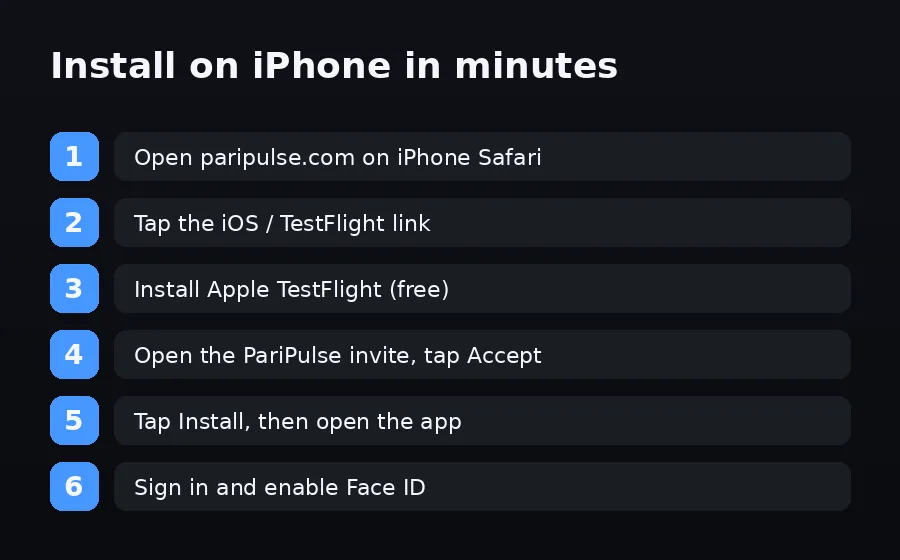
- Open paripulse.com in iPhone Safari. 2. Tap the iOS / TestFlight link near the download button. 3. Install Apple TestFlight from the App Store if you do not have it (it is free and made by Apple). 4. Back on the PariPulse invite, tap Accept. 5. Tap Install, then open the app. 6. Sign in or register and enable Face ID for instant unlock. The whole flow takes a few minutes.
Why TestFlight, and is it safe
TestFlight is Apple's own beta platform — the same app developers worldwide use to distribute builds Apple has reviewed. Installing PariPulse through it does not jailbreak your phone or bypass iOS security; Apple still sandboxes the app. A TestFlight build can occasionally show an 'expired' notice when a new version ships — just reopen the PariPulse invite to get the latest build. Never install an 'iOS PariPulse' from a website profile that asks you to trust an enterprise certificate; the official route is TestFlight only.
iOS requirements and Face ID
The app needs iOS 15 or newer on iPhone or iPad. After your first password login you can turn on Face ID (or Touch ID on older devices) so the app unlocks in under two seconds. Notifications are optional and power kick-off, won-bet and bonus alerts. If your iPhone is older than iOS 15, use the mobile-optimised site at paripulse.com, which works as a full progressive web app you can add to your home screen.
Disclosure & responsible play
PariPulse Affiliate earns commission on referrals; editorial coverage is unaffected. Use the in-app deposit limits and session timers. 18+ only. Help: iCall (+91-9152987821) or BeGambleAware.org. See our responsible gambling page.